

N8N generator workflow is changing the way teams manage repetitive digital tasks. In today’s fast-moving software development world, automation has become more of a necessity than a luxury. Whether it’s organizing leads, updating project status, or backing up important files, tools like n8n help make these processes quicker, more reliable, and less hands-on.
Unlike many closed systems, N8N gives you flexibility. You can host it yourself, build logic that fits your exact needs, and use its visual interface to create workflows without writing heavy code. It supports a wide range of services, from Gmail and GitHub to custom APIs and databases, without locking you into specific platforms or pricing tiers.
In this blog, you’ll find ten practical automation examples built with N8N. We’ll also cover how it works, when it might not be the best choice, and what kind of knowledge you’ll need to use it effectively. Whether you’re running a startup, building tools for clients, or improving team operations, this guide will help you decide if n8n fits into your workflow.

What is n8n Generator Workflow?
It is a node-based automation tool that lets you connect different services and build custom workflows. You can automate tasks across hundreds of tools like Gmail, GitHub, Slack, Notion, and more.
Unlike closed platforms like Zapier, n8n is self-hosted and open source, which gives you more control.
How n8n Works?
n8n uses a visual interface where you build flows using “nodes.” Each node represents a step in the process like reading an email, making an API call, or storing data.
You can:
Trigger a workflow with a webhook, cron job, or app event
Connect multiple apps using logic and conditions
Monitor runs and debug directly in the UI
This approach works great for both simple and advanced automation.
Best Use Cases
Here are some of the most common and useful scenarios:
Marketing Teams: Auto-post blogs on social media
Customer Support: Route new form responses to Slack or Trello
Engineering Teams: Use n8n Git to clone repos or trigger CI actions
Finance: Move invoice attachments from Gmail to Google Sheets
Product Teams: Auto-create Jira tickets from feedback emails
These teams save hours per week with just a few automated workflows.
Real Example: Using n8n Git to Automate Code Backups
A development agency we worked with needed to regularly back up private Git repositories. We used the n8n Git integration to create a scheduled workflow that clones the repo weekly and uploads it to AWS S3. It’s a simple but effective safety net.
Real Example: Gmail Sorting Using n8n Gmail Credentials
A solopreneur used n8n Gmail credentials to build a custom filter for their inbox. All receipts from a specific client are now tagged and stored in Google Sheets, making monthly accounting easy.
Make sure your credentials are up to date, and enable the necessary Gmail API scopes in your Google project.
Comparing Flowise vs n8n: Which Tool Fits You?
It is a common debate in the automation space. Here’s a simple breakdown:
Flowise is ideal for AI workflows, like building chatbots or handling language tasks.
N8N works best for connecting APIs, automating apps, and full control of data flow.
In our experience, if your focus is integration, n8n generator workflow is more flexible.
When to Avoid it?
While n8n is powerful, it’s not for everyone. You might want to consider a n8n alternative if:
You need drag-and-drop simplicity without any configuration
You don’t want to self-host or manage your server
Your team prefers SaaS tools with less tech overhead
Alternatives like Zapier or Make might serve your needs better in those cases.
How Much Knowledge You Need to Use n8n Generator Workflow
You don’t need to be a full-time developer, but some basic tech skills help. Here’s what we recommend:
Understanding of APIs (GET/POST, headers, etc.)
Ability to read simple code or JSON
Basic logic (if/else, loops)
That said, many users start with templates or community examples. And if you’re a dev team, n8n becomes a powerful backend helper.
Choosing the Right n8n Alternative for Your Needs
Sometimes n8n isn’t the best fit. If your use case is very simple or needs quick setup without self-hosting, look into:
Zapier: Best for non-tech users
Make: More visual, good for creative teams
Pipedream: More code-friendly, like n8n Git but hosted
Still, for control and flexibility, it remains our top recommendation.
Breaking Down an n8n Generator Workflow Example: Step-by-Step Flow Explained
This n8n generator workflow is triggered manually and automates data processing across multiple sources and APIs, ultimately storing the results in Baserow. Here’s what each step does:

When clicking ‘Test workflow’
This is a manual trigger node. It starts the workflow when the user clicks the “Test workflow” button in the n8n UI.Baserow1 (getAllRow)
This node fetches rows from a Baserow database. It likely contains base input data like URLs, keywords, or identifiers that will be processed.Loop Over Items1
This loop breaks the fetched data into single items, allowing each to be processed individually in the next steps.Spider (HTTP Request)
Sends a POST request (probably to a scraping API or a serverless function) using the current item’s data. It retrieves information such as web content or metadata.Split Out2
This node splits the received response into multiple items. For example, if the spider returns multiple links or pieces of data, they are broken into separate records here.Loop Over Items
Iterates over the 182 items returned, one at a time. Each item might represent a piece of content, a page, or a data entry.HTTP Request4
Sends another HTTP POST request — maybe for content validation, enrichment, or further processing of each scraped item.Split Out
Splits the response from the second API into smaller parts, possibly to handle nested data or multiple attributes per item.HTTP Request1
Sends the split data to another external API, possibly for classification, summarization, or metadata generation.Aggregate
Combines or merges the processed data back into a structured format, such as a JSON object or list of key-value pairs.Baserow (createRow)
Finally, this node writes the aggregated results back into a Baserow database creating new rows for each processed item.
How to Use Automation Workflows for Marketing Teams
Automation isn’t just for tech teams — it’s also a game-changer for marketers who want to save time and stay focused on high-impact work.
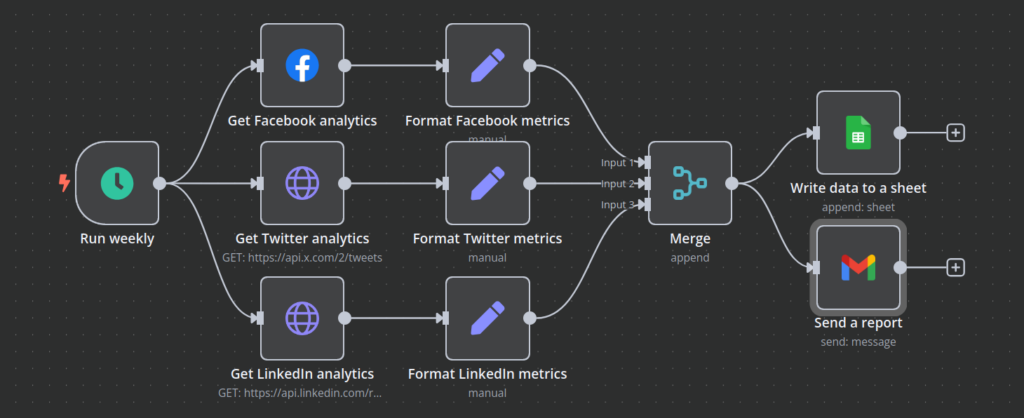
Here are some smart ways marketing teams can use workflow automation:
Lead Collection & Follow-Up: Capture form submissions from your website, send a quick thank-you email, and add the contact to your CRM — all without manual input.
Social Media Scheduling: Share new blog posts or product updates automatically by linking your content system with your social media scheduler.
Email Campaign Insights: Track opens, clicks, and replies in real-time, then update your audience lists or trigger follow-ups based on engagement.
Monitor Competitors or Trends: Set up alerts when certain keywords appear on competitor websites, blogs, or social feeds, and log the updates to a spreadsheet.
Event and Webinar Automation: After hosting an event, instantly send recap emails, update participant lists, and notify your sales team, no copy-pasting required.
These kinds of workflows help marketers stay organized, reduce repetitive tasks, and respond to opportunities faster, all with minimal manual effort.
Below are ten practical ways you can use t to simplify your work and save time, based on real scenarios we see every day.
1. Auto-Save Gmail Attachments to Drive
Many teams receive contracts, invoices, or creative assets through Gmail. Manually saving these files takes time and risks human error.
It solves this by:
Using the Gmail node to watch for new emails with attachments
Filtering based on subject, sender, or label
Uploading attachments to a specific folder in Google Drive
Real Use: A design agency saves client feedback docs in organized folders using this setup.
2. Post GitHub Issues to Slack Automatically
In fast-moving development teams, new GitHub issues need to be seen immediately. Instead of checking GitHub repeatedly, use n8n to automate alerts.
Steps:
Trigger the workflow when a new issue is created in a GitHub repo (GitHub node)
Format the issue details (title, link, author)
Send a message to a Slack channel (Slack node)
Real Use: A SaaS company routes bugs reported by users directly to their dev channel.
3. Tweet New Blog Posts as They Go Live
You want your content to reach more people without remembering to share it manually.
With n8n:
Use an RSS Feed node to monitor your blog
Trigger the Twitter node when a new post is detected
Tweet the title and link instantly
Real Use: An e-learning platform grew its blog traffic by auto-sharing every post on social media.
4. Send Typeform Submissions to Notion
Handling form entries manually? This use case eliminates that:
Use the Typeform Trigger to detect new responses
Map the form fields to a Notion database (Notion node)
Add a new row with client info, time, and tags
Real Use: A consulting agency uses this to build a real-time CRM of inbound leads.
5. Automate Email Processing for Your Team
Manually sorting emails can eat up hours each week. Here’s how to simplify it:
Watch for Important Emails: Set up your email tool to flag messages with keywords like “Bug” or “Error.”
Extract Key Details: Automatically pull out the subject and body for clarity.
Trigger Automated Actions: Use this data to create tasks, update CRM records, or kick off a Slack alert.
Real Use: A product team uses this workflow to convert support emails into actionable tasks without a single copy-paste.
6. Automate Regular Backups in Your Workflow
Keeping backups of key data is essential, especially during transitions or migrations. Here’s how to set it up:
Schedule the Task: Use a cron-like scheduling tool to run the backup at a specific time.
Copy the Important Data: Automatically gather files, databases, or other resources.
Store Safely: Zip and upload them to Dropbox, AWS S3, or Google Drive.
Real Use: A fintech team automates backups of their entire system every Friday at midnight, so they never lose a line of code or data.
7. Clean and Tag Customer Data Automatically
When customer info comes from different sources, it often contains duplicates or inconsistencies.
Set up a workflow that:
Pulls entries from a database or Google Sheet
Runs logic to remove duplicates, format names, or tag users
Writes cleaned data into a new sheet or tool
Real Use: A startup cleans newsletter signups and segments them by behavior for better targeting.
8. Send SMS Alerts for Failed Workflows
Automation fails sometimes — and you need to know right away.
You can:
Use the ‘Error Trigger’ node to catch failed workflows
Send an SMS (e.g., via Twilio node) with the error info
Optionally notify via Slack or email, too
Real Use: A shipping company tracks API outages and gets real-time alerts before customers are impacted.
9. Automate Lead Follow-Up in Marketing
Following up with leads can be time-consuming — here’s how to make it automatic:
Listen for New Leads: Use form submissions or CRM updates as triggers.
Personalize the Response: Send tailored emails or schedule follow-ups with key info.
Update CRM Records: Automatically log the interaction so your team always has the latest details.
Real Use: A marketing agency uses this flow to respond to website leads instantly and track every step, boosting conversion rates without missing a beat.
10. Trigger Custom Emails After Form Submissions
Let’s say someone fills a form to request a quote. Instead of manually replying:
Detect the form submission (Typeform/Google Forms)
Format a personalized message
Send it via Gmail or Outlook (email node)
Real Use: A freelance developer sends instant estimates to leads, improving conversion rate and saving hours weekly.
What Features Zaytrics Gives to Its Clients
At Zaytrics, we don’t just automate workflows, we build tailored automation systems that align with your business goals.
Here’s what you get when working with us:
Custom-Built Workflows: Whether it’s a simple Gmail sync or a multi-app system using n8n generator workflow, we create flows that match your exact needs, no unnecessary steps, no bloated templates.
Secure Credential Handling: We help configure sensitive data securely and in compliance with best practices.
Git Integration & Versioning: For dev teams, we offer n8n Git support to keep workflow versions clean, trackable, and deployable across environments.
Cloud or Self-Hosted Setup: We assist you in choosing the right hosting on cloud, on premises, or hybrid, depending on your team’s preferences.
Team Training & Documentation: Once your system is live, we train your staff to manage, update, and monitor workflows confidently.
Whether you’re a startup looking for speed or an enterprise aiming for scale, Zaytrics brings the experience and tools to help you automate smartly. Discover how we do it on our “What We Do” page!
Contact Zaytrics to Build Your Automation Workflows
Ready to save time, reduce errors, and scale faster with automation?
Our team at Zaytrics specializes in building secure, efficient, and fully custom automation workflows using tools like n8n generator workflow. We help you connect your apps, streamline your operations, and make the most of your existing tools.
Get in touch with us today to:
Discuss your use case
Get a free automation audit
See a live demo of what’s possible
Email: customersupport@zaytrics.com
Website: https://zaytrics.com/
Schedule a call: https://zaytrics.com/contact/

